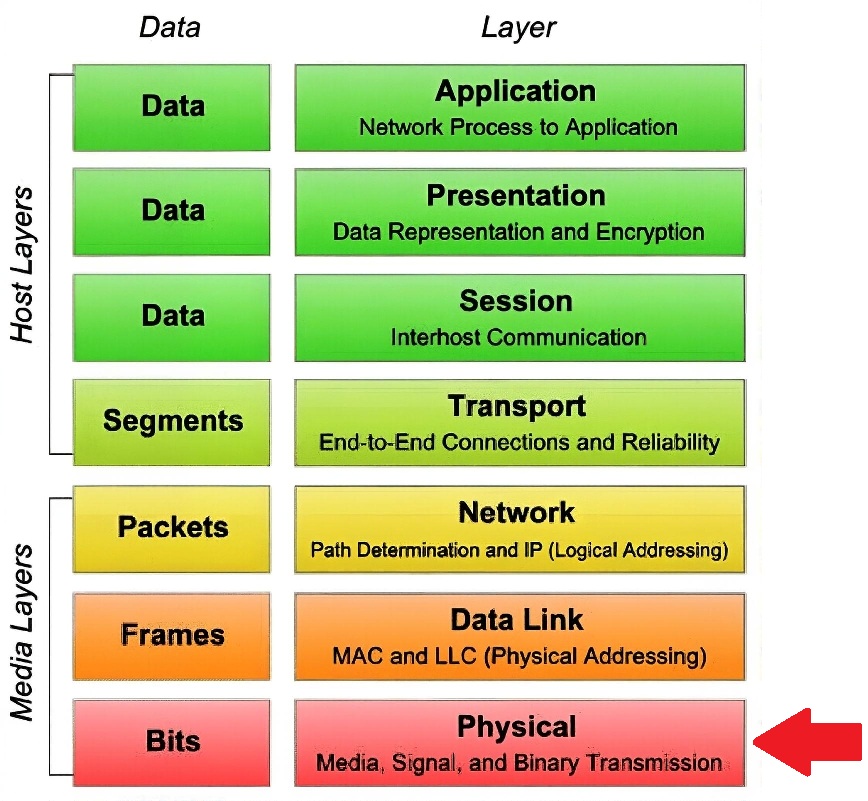
NMOS (Networked Media Open Specifications) is primarily a set of open specifications developed by the Advanced Media Workflow Association (AMWA), not software itself. It's a family of vendor-neutral, royalty-free specs designed to make IP-based media workflows (like SMPTE ST 2110) interoperable, scalable, and easy to manage. The core idea is to provide APIs and protocols for discovery, connection management, control, and more — so devices from different vendors can "talk" to each other without proprietary hacks. Another way to look at the
Stack.
That said, to implement NMOS in a real system, you need software or firmware that complies with the specs. This can come from open-source projects, commercial vendors, or custom development. No single "NMOS software" package exists; instead, you integrate NMOS-compliant components into your workflow. Here's a breakdown of what's typically required and where to get it.
Required Software Components for NMOS Implementation
A basic NMOS setup needs these key pieces (focusing on the most common specs like IS-04 for discovery and IS-05 for connections):
Registry Server (for IS-04 Discovery & Registration)
What it does: Acts as the central "phone book" where devices register themselves and their capabilities (e.g., senders publish RTP streams, receivers list what they can subscribe to). Controllers query it to find and connect devices.
Software options:
Open-source: AMWA's reference implementation (nmos-cpp or nmos-js libraries) — free on GitHub. You can run it as a standalone server (e.g., on Linux via Docker).
Vendor-provided: Many broadcast vendors bundle registries in their orchestration software:
Controller / Orchestrator (for IS-05 Connection Management + Others)
What it does: Queries the registry (IS-04), sets up connections (IS-05), and handles control (e.g., IS-07 for events/tally, IS-08 for audio mapping).
Software options:
Open-source: AMWA nmos-js (browser-based controller demo), or build your own using libraries like libnmos (C++).
Vendor-provided:
Sony: IP Live System Manager
Evertz: MAGNUM-OS
Grass Valley: GV Orbit
Ross Video: dashBoard
Imagine: Magellan
Lawo: VSM (Virtual Studio Manager) or HOME
Third-party / Commercial: Nevion VideoIPath, Pebble Automation, or custom tools from system integrators like Diversified or NEP.
Device Implementations (Senders/Receivers)
What it does: Actual gear (cameras, encoders, decoders, multiviewers) that registers with the registry and responds to connections.
Software options:
Open-source: Libraries like nmos-cpp to add NMOS to custom software (e.g., FFmpeg/GStreamer with NMOS plugins).
Vendor-provided: Most ST 2110 gear is NMOS-compliant out of the box:
Encoders/Decoders: Evertz (e.g., evEDGE), Grass Valley (e.g., IQU), Riedel (MediorNet), Sony (IP Live), Ross (XPression), Imagine (Selenio).
Cameras: Sony HDC series, Grass Valley LDX, ARRI ALEXA with IP.
Multiviewers: Evertz VIP, Ross Ultrix, Imagine MV.
Optional Add-Ons for Advanced Specs
IS-07 (Events & Tally): Software like AMWA nmos-event-tally library.
IS-08 (Audio Channel Mapping): Vendor tools like Lawo VSM or open-source GStreamer plugins.
IS-09 (System Parameters): Often bundled in registries/controllers.
IS-10 (Authorization): Security extensions, e.g., in Evertz MAGNUM.
How to Get Started with NMOS Implementation
If you're building from scratch: Use AMWA's open-source GitHub repos (nmos-cpp, nmos-js) to set up a registry and test devices. It's free but requires development skills.
If you're buying: Look for "JT-NM Tested" badge (interoperability certification) on vendor gear. Most major broadcast vendors (listed above) support IS-04/05 natively.
Cost: Open-source = free (but time to integrate). Vendor software = licensed per device/facility (e.g., $10K–$100K+ for enterprise controllers).
Testing: Use AMWA's NMOS Testing Tool (free on GitHub) to validate compliance.
In short: NMOS is specs — to implement, use compliant software from AMWA open-source or vendors like Sony, Evertz, Grass Valley. Start with a registry + controller for discovery/connections, then add devices. If you're in broadcast, check JT-NM Tested lists for proven gear.
 Study Plan
2110 Topo
Study Plan
2110 Topo
